Deluxe Moon - Moon Calendar, P
- 4.9
- Rating
- 50.00K
- Installs
- $3.99
- Price

 Analysis by App-foxy
I approached Deluxe Moon as a focused moon-calendar tool rather than as a replacement for a complete daily weather service. That distinction matters. Its purpose is to help me understand the lunar cycle, follow the Moon’s changing appearance, and plan around lunar dates without burying the information under unrelated forecasts. For anyone who enjoys astronomy, night photography, gardening traditions, fishing calendars, or simply wants a better feel for the sky, that narrow focus can be genuinely useful.
The app comes from LWS Research and sits in the weather category, although its experience feels more specialized than a standard weather app. It is a paid app priced at $3.99, aimed at everyone, and its long presence on mobile platforms gives it a more established feel than a newly released utility. The current version is 1.110 and it runs on Android 6.0 or newer. I also noticed that its public reception is unusually strong: it holds a 4.9 average from around 3.1 thousand ratings, with roughly 547 written reviews and over 50 thousand installs.
Those figures do not automatically prove that it will suit every person. They do, however, suggest that the app has found a clear audience. My own view is that it works best when I treat it as a visual lunar reference: something I open for a specific question, inspect carefully, and close again. It is less convincing for someone who wants radar maps, storm warnings, hourly temperature charts, or a broad forecast dashboard.
You May Also Like

 Blood Strike: 2.5 Anniversary
Blood Strike’s Loadouts Turn Every Drop Into a Tactical Gamble
A close look at Blood Strike’s custom loadouts: how fast access to signature weapons reshapes its battle royale rhythm, rewards preparation, and narrows the gap between fights.

 Pandora - Music & Podcasts
Pandora’s Music Is Easy to Start, but Harder to Recover
Pandora’s strength is its low-effort path from a seed to a station. Its weak spot is how much confidence it asks you to place in connection, setup, and quiet recovery.

 8 Ball Pool
 Is Built on Rivalries, Rematches, and Routine
A close look at the rivalries, rematches, shared routines, and unanswered safety questions that turn a quick pool match into a persistent mobile community.

 Samsung Music
’s Quiet Strength Is Playing What You Already Own
Its reach comes less from spectacle than from dependable access to a personal library. That simplicity is both the app’s strongest retention engine and its ceiling.

 AccuWeather: Weather Radar
AccuWeather Review: A Quick, Clear Forecast for Everyday Decisions
For everyday plans, the best forecast is the one you can understand quickly. AccuWeather makes rain timing, radar, and local conditions easy to act on, with a few trade-offs.

 Hill Climb Racing
Why Hill Climb Racing Still Turns Crashes Into One More Run
A tiny car, a bumpy hill and one more upgrade: Hill Climb Racing keeps resurfacing because its simple chaos makes every near-miss feel personal.
More From Our News Desk
View All News


What the lunar calendar experience is really like
I find the most useful way to approach a lunar calendar is to begin with a question: am I choosing a date, or checking what the sky is doing right now? Keeping that distinction clear makes the app easier to judge and prevents a calendar view from becoming a substitute for looking outside. I’d use this section to explain how its lunar focus fits into everyday planning.
A specialized view instead of a crowded forecast screen
The strongest quality here is concentration. Many weather apps compete for attention with alerts, maps, advertising, pollen information, air-quality panels, and constantly changing forecast cards. Deluxe Moon takes a different route by making the Moon the subject. That makes it easier for me to think about lunar phases as a sequence rather than as an isolated icon in a general forecast.
That focus is particularly helpful when I want to answer a practical question such as whether the Moon will be close to full during an evening walk, whether a late-night photo session is likely to have strong moonlight, or how the lunar cycle lines up with a planned outdoor activity. Instead of searching through a broad weather interface, I can use a calendar-oriented view to place the lunar change in context.
The app’s identity is also clear from its store summary, which presents it as a lunar calendar for 2021. I would not interpret that wording as a promise that it replaces current weather information. A lunar calendar can tell me about the Moon’s cycle, but it cannot tell me whether clouds, rain, wind, or poor visibility will prevent me from seeing it. For a real outdoor plan, I would still check a conventional forecast separately.
Useful for people who think in dates
I found the calendar approach more useful than a simple “current phase” display. A single phase icon answers what is happening now, but a calendar helps me connect several days together. That matters when planning photography, observing, travel, or personal routines that depend on a particular part of the lunar cycle.
A realistic example is a weekend night walk. I might first use a normal weather service to check cloud cover and temperature, then open Deluxe Moon to understand how much natural light the Moon may provide. If the lunar timing is not suitable, I can move the outing without confusing a lunar prediction with a weather prediction. That separation is one of the app’s practical strengths.
It can also help someone who is learning basic astronomy. Rather than memorizing the order of lunar phases, I can return to the calendar and watch how the appearance changes over time. The visual element makes the cycle easier to grasp than a paragraph of dates. For a child or an adult beginner, that can turn an abstract astronomical process into something observable.
Where it sits beside the usual alternatives
Compared with a general weather app, this tool gives the Moon more attention and less competition. A mainstream forecast application is better when I need immediate safety information, precipitation timing, severe-weather notices, or location-based conditions. Deluxe Moon is better when the lunar cycle itself is the reason I opened my phone.
Compared with a basic calendar reminder, it offers a more meaningful visual reference for lunar timing. A normal calendar can store a note saying “full Moon,” but it usually does not make the progression feel as intuitive. On the other hand, someone who only wants occasional reminders may find a dedicated app excessive, especially because this one requires a purchase rather than being a casual free download.
It also differs from a stargazing application. A sky map is normally designed to identify stars, planets, or constellations in the direction I am pointing the phone. This app’s value is more calendar-based and lunar-focused. If my main goal is locating deep-sky objects, I would choose a dedicated astronomy tool instead. If my main question is how the Moon’s phase develops across dates, the narrower design makes more sense.
Trust, controls, and sensible use
I’m careful to separate useful controls from assumptions about privacy or reliability. A sensible routine is to check the app’s settings, choose only the access that supports how I use it, and keep a separate source for conditions that affect outdoor safety. That gives me a practical basis for deciding whether this focused tool belongs in my regular routine.
Why the paid model changes the decision
The $3.99 price is not a major barrier for someone who already knows they want a dedicated lunar calendar, but it does change how I evaluate the app. I would not install it casually just to see whether I might use it once. The better approach is to ask whether lunar planning is a recurring need. Photographers, amateur observers, educators, and people who regularly plan evening activities have a clearer reason to pay than someone who checks the Moon only a few times each year.
A paid app can also feel more straightforward than a free utility built around aggressive promotion, but I would still avoid assuming anything about its data practices simply because money changes hands. Trust should come from visible choices and the permissions or controls shown on the device and in the store, not from the price alone. Before installing, I would review the permission prompts carefully and decline anything that is not necessary for the way I intend to use it.
Because the app is rated for everyone, it is approachable for a broad audience. That does not mean every setting will be equally obvious to a young user or a first-time astronomy learner. I would spend a few minutes exploring the calendar and display rather than handing it over and expecting the purpose to be self-explanatory.
Permission awareness is part of a trustworthy setup
For a lunar calendar, I pay close attention to location-related choices. If I want lunar times or views tailored to where I am, a location setting may be relevant, but I prefer to decide whether that access is worth the convenience. When an app offers a manual location alternative, I generally prefer entering a place myself; when it does not, I consider whether the location-dependent benefit justifies the permission.
I do not treat a permission prompt as proof that an app is unsafe, nor do I treat the absence of a prompt as proof that it collects nothing. The useful habit is to read each request in context, check the operating system’s permission manager afterward, and revisit the choice if my use changes. With a focused utility like this, I would rather grant the smallest practical access than approve everything automatically.
The same caution applies to notifications. A lunar calendar may be useful without sending frequent alerts, so I would keep notifications off unless I specifically wanted reminders. This preserves a quieter phone and makes the app feel like a tool I consult, not a service that continually demands attention.
Data-sensitive moments to think about
The most data-sensitive moment is initial setup, especially if the app asks for information connected to location or device use. I recommend pausing at that point instead of tapping through quickly. Decide whether you need automatic location, whether a manually selected place is sufficient, and whether notifications add real value to your routine.
Another sensitive moment is sharing the phone with someone else. Because the app is suitable for everyone, a family member may open it without understanding which choices were made during setup. I would explain location and notification settings before letting a child use it, and I would periodically inspect the system-level controls rather than relying only on memory.
There is also a practical privacy trade-off in using any location-aware calendar. A precise location can improve convenience, but it is more information than I want to provide when a broad region or manual selection would do. My recommendation is simple: use the least precise option that still answers your question, then check whether the result is accurate enough for your needs.
Keeping control over the experience
I like tools that let me choose when to look at information. This app is most comfortable in that role. I can open it when I want to inspect the lunar calendar, compare dates, or prepare for an evening plan, without making it the center of my entire weather routine.
That user-controlled approach is especially useful for people who dislike notification-heavy apps. I would leave alerts disabled at first, use the calendar manually for a week, and only enable reminders if I repeatedly miss a date I care about. This is a small but effective way to test whether a feature supports my routine or merely adds noise.
I would also keep a separate weather application installed. That is not a criticism of Deluxe Moon; it is a sensible division of responsibilities. The lunar calendar can guide the timing and expectations of an activity, while the weather service handles conditions that affect comfort and safety. Treating one as a substitute for the other is where disappointment starts.
Three less obvious ways I would use it
First, I would use the calendar as a planning filter for photography rather than as a guarantee of a good photograph. A bright Moon can be useful for landscapes but can wash out faint stars, while a darker lunar period may suit deep-sky work if the rest of the sky cooperates. The app helps me choose the lunar window; a forecast and local knowledge still determine whether the outing is worthwhile.
Second, I would use it to teach the difference between a date-based cycle and a visible sky condition. A learner can follow the Moon’s phase in the app, then look outside and notice that clouds or the Moon’s position can change what is actually visible. That comparison prevents the common mistake of assuming that a calendar entry guarantees an immediate view.
Third, I would use it as a coordination tool for small groups. If friends are arranging an evening observation session, agreeing on a lunar period before discussing transport or equipment can save time. The trade-off is that everyone still needs to check local weather and visibility, so the app supports planning but cannot settle the whole decision.
Who should skip it
I would skip this purchase if I mainly need severe-weather alerts, minute-by-minute rain predictions, radar, or temperature trends. The lunar focus does not solve those problems. I would also skip it if I only want a tiny phase icon on my home screen and do not care about a calendar view; a simpler solution may be enough.
It may not be the right fit for someone who expects a modern all-in-one dashboard with every environmental measurement in one place. Deluxe Moon’s appeal comes from specialization, and specialization always means giving up breadth. Likewise, users who prefer not to manage permissions or settings themselves may find the setup less comfortable than a very basic calendar widget.
Finally, I would be cautious about buying it for a one-time event. If I am planning one holiday photograph or one school lesson, I might use a free reference or an existing astronomy resource first. The paid app becomes easier to justify when the lunar calendar will be part of my regular planning rather than a single-use curiosity.
My recommendation after weighing the trade-offs
My overall impression is positive, but deliberately specific. This is a good choice for someone who wants a dedicated lunar calendar, appreciates visual learning, and is willing to keep a separate source for ordinary weather. The strong user rating and established history make it easier for me to consider, while the $3.99 purchase encourages a more deliberate decision.
I would install it for a photographer, an amateur Moon observer, a teacher introducing lunar phases, or anyone who regularly plans activities around the night sky. I would not recommend it as the only weather app on a phone, and I would not present it as a universal astronomy solution. Its value depends on whether the Moon is a recurring part of your decisions.
Before settling in, I would check the app’s current permission prompts, disable notifications unless they are genuinely useful, and compare its lunar information with the separate weather forecast I already trust. That workflow respects both convenience and privacy. The best reason to choose it is not that it does everything, but that it gives one subject—the Moon—enough room to become genuinely understandable.
For me, that is the cautious verdict: Deluxe Moon is a focused, paid weather-category app with a clear purpose and a strong audience fit. It earns a place on my phone when I want to plan by lunar timing, learn the cycle, or prepare for night photography. It should stay off the shortlist when my real need is storm protection, detailed atmospheric forecasting, or a broad daily weather dashboard.
FAQs for Deluxe Moon - Moon Calendar, P
01What is Deluxe Moon - Moon Calendar used for?
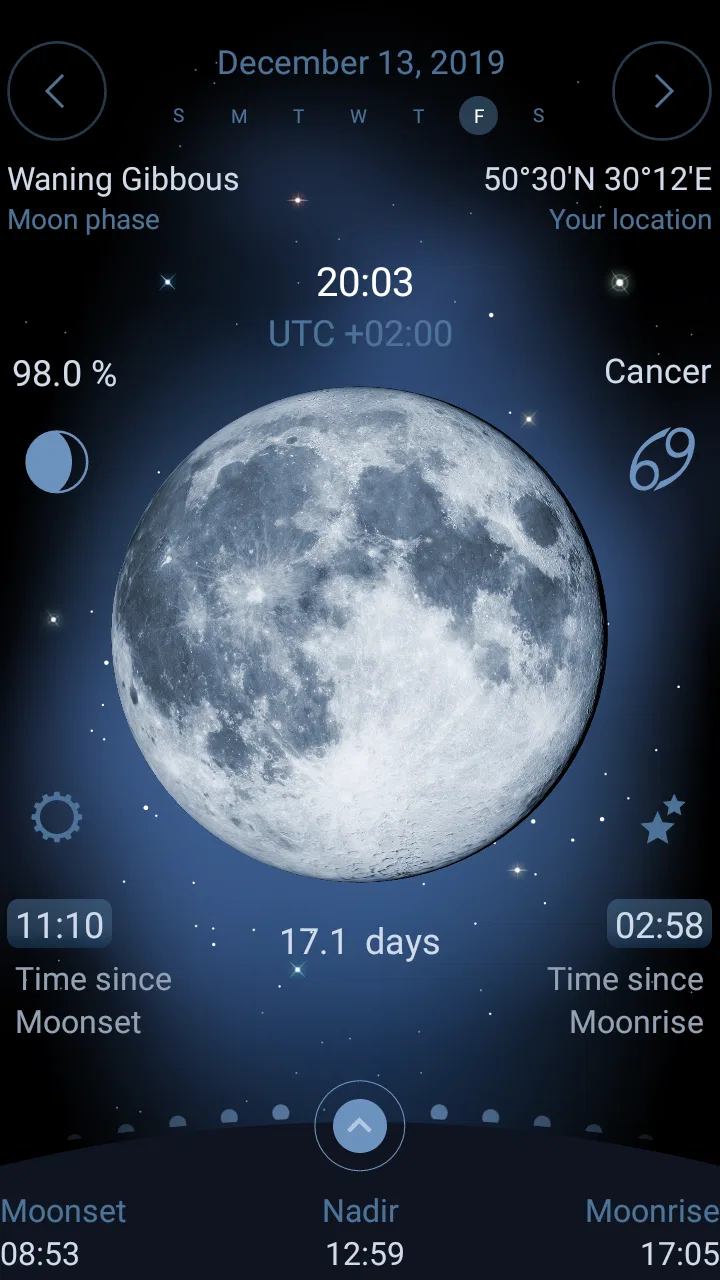
Deluxe Moon - Moon Calendar is designed to help users follow the Moon’s phases, position, illumination, and monthly lunar cycles. It presents astronomical information in a visual calendar and can be useful for people interested in stargazing, astrology, gardening traditions, photography planning, or simply understanding how the Moon changes throughout the month. The app also provides additional details such as moonrise and moonset times, depending on the selected location.
02Does Deluxe Moon work without an internet connection?
Many of the app’s core calendar and lunar-phase features can generally be viewed without a continuous internet connection once the application has the necessary location and date information. However, some functions may rely on device location services, updated astronomical data, or other online resources. For the most accurate results, especially after traveling to another region, it is recommended to open the app while connected and allow it to update its calculations.
03Does the app require access to my location?
Deluxe Moon can use your location to calculate local moonrise, moonset, lunar position, and related astronomical details. You may usually choose a location manually instead of granting automatic location access, which is helpful if you prefer greater privacy or want to check information for another city. If location permission is disabled, some local features may be less accurate until a place is selected manually.
04Is Deluxe Moon an astronomy app or an astrology app?
The application combines practical lunar and astronomical information with features that may appeal to users interested in astrology and lunar traditions. Its moon phases, illumination, rise and set times, and calendar data are astronomy-oriented, while interpretations connected with zodiac signs or lunar influence are presented for personal interest rather than scientific prediction. Users should therefore treat symbolic or astrological content as entertainment or guidance, not as verified scientific advice.
05Is Deluxe Moon free to download, and are there in-app purchases?
Availability, pricing, and included features can vary between the Android and iOS versions and may also change with updates. Before downloading, check the official store listing to see whether the app is free, supported by advertising, or offered as a paid download with optional purchases. Review the purchase details carefully, particularly if premium tools, expanded information, or an ad-free experience are offered through subscriptions or one-time payments.
Pros
- Detailed lunar calendar with moon phases
- age
- and illumination data.
- Includes moonrise
- moonset
- and moon position information for planning.
- Clear visual design makes astronomical details easy to understand.
- Useful widgets provide quick lunar information from the home screen.
- Supports multiple locations for checking local lunar conditions.
Cons
- Some advanced features may require a paid upgrade.
- The interface can feel dense for users seeking only basic moon phases.
- Location-based data depends on accurate device settings and permissions.
- Frequent notifications may feel unnecessary if enabled by default.
- Astronomical information may be overwhelming without prior knowledge.

Deluxe Moon - Moon Calendar, P
Gallery